Chapter 6. Univariate Graphs
NREC4107 - Applied Econometrics
Opening purpose
This chapter updates the univariate graphs using the actual course milk dataset:
Milk_Data_S2025n.csvA univariate graph studies one variable at a time. It helps us understand the distribution of a numeric variable or the frequency of categories in a categorical variable.
This chapter uses only observed information from the attached dataset. The dataset has 258 observations and 12 columns.
Applied question
What does each main variable in the milk dataset look like when examined separately?
Key idea
A univariate graph answers a basic question:
What is the distribution of this variable?
For numeric variables, we can use:
- histogram
- density plot
- box plot
For categorical variables, we can use:
- frequency table
- bar chart
A univariate graph is descriptive. It does not explain why the pattern exists.
Loading the dataset in Google Colab
The examples below assume that the dataset is saved in Google Drive as:
../data/Milk_Data_S2025n.csvStudents should change the file path if they saved the dataset somewhere else.
from google.colab import drive
drive.mount('/content/drive')

import pandas as pd
import numpy as np
import matplotlib.pyplot as plt

data_path = "../data/Milk_Data_S2025n.csv"
milk_data = pd.read_csv(data_path)

milk_data.head()
Numeric variables in the dataset
The main numeric variables are:
numeric_vars = ["Price", "Size", "Pieces", "Volume"]

milk_data[numeric_vars].describe()
The dataset also allows us to construct a unit-price style variable:
milk_data["Price_per_1000_volume"] = (milk_data["Price"] / milk_data["Volume"]) * 1000

milk_data[["Price", "Volume", "Price_per_1000_volume"]].head()
This variable is called Price_per_1000_volume to avoid assuming a physical unit beyond the dataset. If the class confirms that Volume is measured in milliliters, it can be interpreted as price per liter.
Price distribution
The observed Price variable ranges from 100.00 to 4,990.00. The mean price is 1,028.08, and the median price is 850.00.
plt.figure(figsize=(8, 5))
plt.hist(milk_data["Price"], bins=15, edgecolor="black")
plt.title("Distribution of Milk Prices")
plt.xlabel("Price")
plt.ylabel("Number of observations")
plt.show()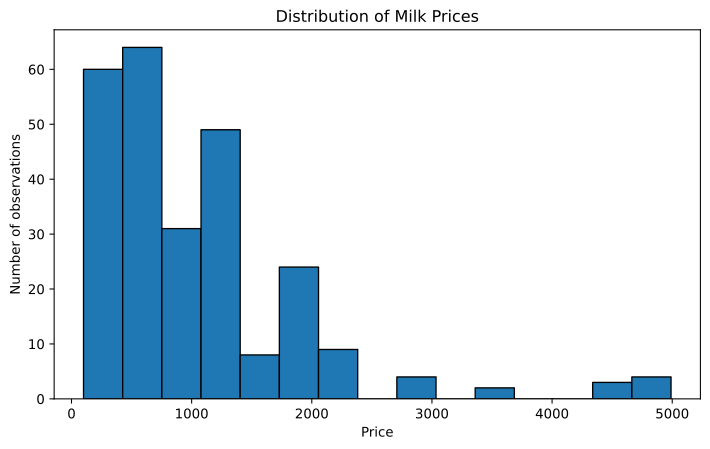
The histogram shows that many observations are concentrated at lower and middle price levels, while some observations have much higher prices. The mean is above the median, which is consistent with a right-skewed price distribution.
This is a visual description only. It does not explain why some products have higher prices.
Volume distribution
The observed Volume variable ranges from 120.00 to 4,000.00. The mean volume is 1,343.21, and the median volume is 1,000.00.
plt.figure(figsize=(8, 5))
plt.hist(milk_data["Volume"], bins=15, edgecolor="black")
plt.title("Distribution of Recorded Volume")
plt.xlabel("Volume")
plt.ylabel("Number of observations")
plt.show()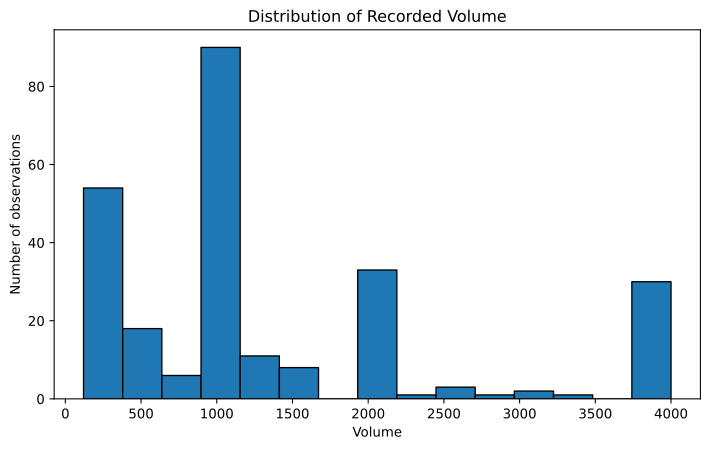
The distribution shows that recorded volumes are not evenly spread across all possible values. Several common package volumes appear repeatedly.
This matters because total price is partly related to package volume. Later chapters will compare total price and unit price more carefully.
Price per 1000 units of volume
The observed Price_per_1000_volume variable ranges from 347.50 to 7,600.00. Its mean is 977.94, and its median is 666.67.
plt.figure(figsize=(8, 5))
plt.hist(milk_data["Price_per_1000_volume"], bins=20, edgecolor="black")
plt.title("Distribution of Price per 1000 Units of Volume")
plt.xlabel("Price per 1000 units of volume")
plt.ylabel("Number of observations")
plt.show()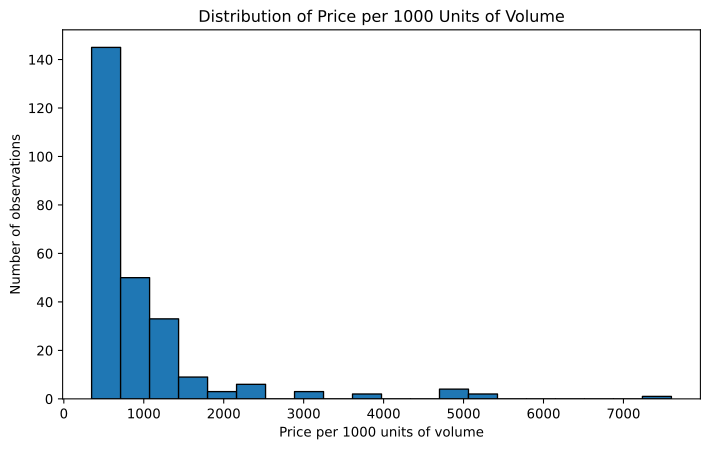
This graph is useful because total price can be difficult to compare when products have different volumes.
The unit-price style variable has a wider upper tail than total price. This suggests that some small-volume or premium products may have high prices relative to their recorded volume. This should be inspected carefully before making any economic conclusion.
Box plot for price per 1000 units of volume
A box plot summarizes the median, quartiles, and values flagged by the interquartile range rule.
plt.figure(figsize=(6, 5))
plt.boxplot(milk_data["Price_per_1000_volume"], vert=True)
plt.title("Box Plot of Price per 1000 Units of Volume")
plt.ylabel("Price per 1000 units of volume")
plt.xticks([1], [""])
plt.show()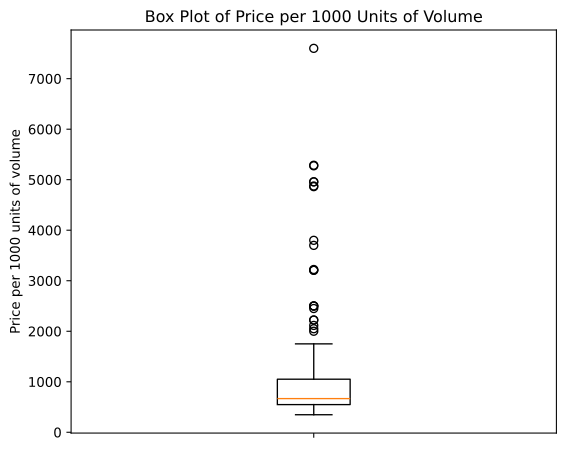
Using the IQR rule, Price has 13 flagged values, while Price_per_1000_volume has 21 flagged values.
Flagged values are not automatically errors. They should be inspected in relation to brand, package type, flavor, and volume.
Categorical variables in the dataset
The main categorical variables are:
categorical_vars = ["Location", "Type", "Brand", "Fat", "Fresh", "Package", "Flavor"]

for var in categorical_vars:
    print("\n", var)
    print(milk_data[var].value_counts())
Observed category counts are:
Location: Oman: 130, UAE: 128Type: Milk: 233, Laban: 18, Kefir: 7Fat: Full: 161, Low: 71, Other: 26Fresh: Yes: 142, No: 116Package: Carton: 131, Bottle: 127Flavor: No: 165, Yes: 93
Brand frequency
The dataset includes 19 brand categories. The most common observed brands are:
milk_data["Brand"].value_counts()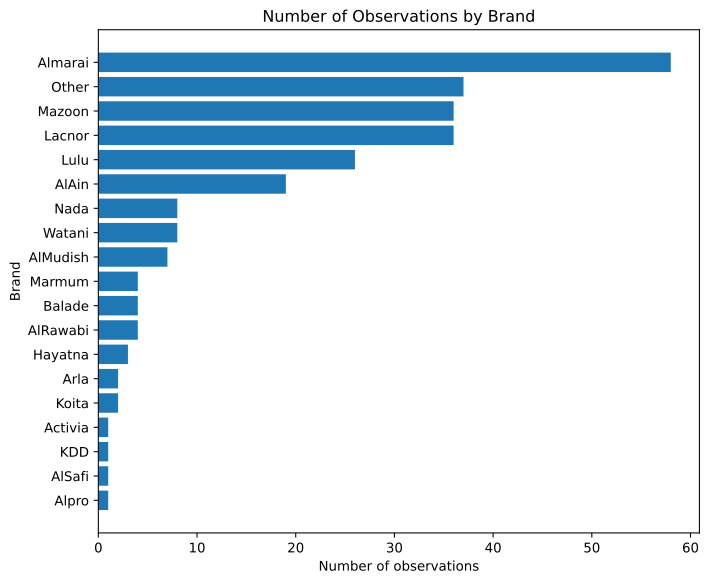
The six most frequent brand categories are: Almarai: 58, Other: 37, Mazoon: 36, Lacnor: 36, Lulu: 26, AlAin: 19.
These counts are frequencies in the dataset. They should not be interpreted as market shares unless the sampling design is known.
Product type frequency
milk_data["Type"].value_counts().plot(kind="barh")
plt.title("Number of Observations by Product Type")
plt.xlabel("Number of observations")
plt.ylabel("Type")
plt.show()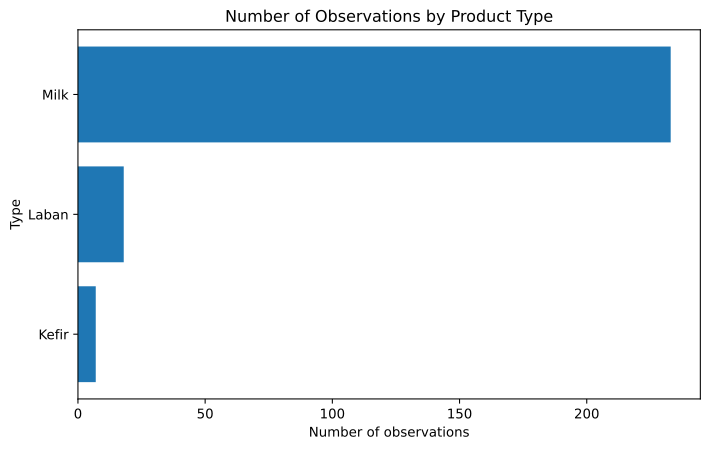
The dataset is dominated by Milk observations, with fewer Laban and Kefir observations.
This matters because conclusions about product types with fewer observations should be made cautiously.
Fat category frequency
milk_data["Fat"].value_counts().plot(kind="barh")
plt.title("Number of Observations by Fat Category")
plt.xlabel("Number of observations")
plt.ylabel("Fat category")
plt.show()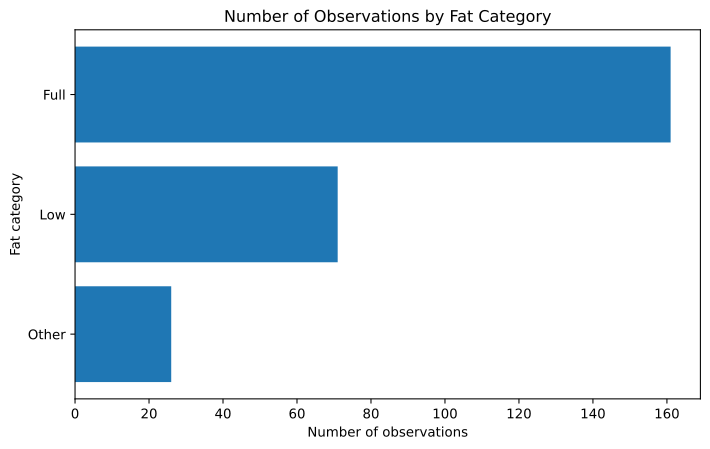
The most frequent fat category is Full, followed by Low and Other.
This pattern describes the dataset. It does not imply anything about consumer preferences or market shares without additional information about data collection.
Package type frequency
milk_data["Package"].value_counts().plot(kind="barh")
plt.title("Number of Observations by Package Type")
plt.xlabel("Number of observations")
plt.ylabel("Package")
plt.show()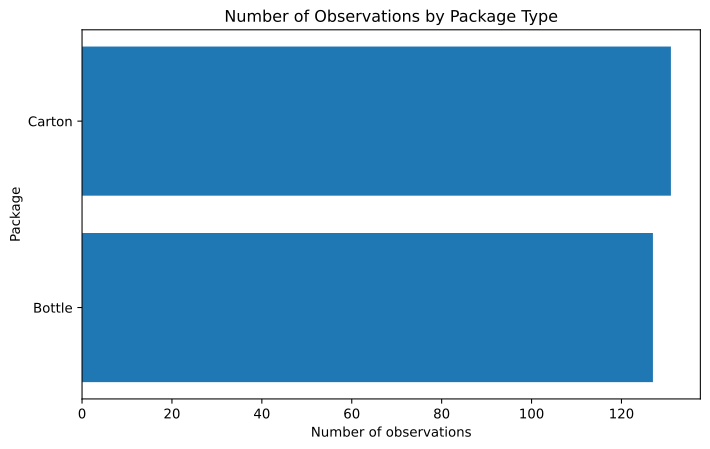
The package variable is nearly balanced between Carton and Bottle: Carton: 131, Bottle: 127.
Package type is likely to be useful in later bivariate graphs and regression models.
Why pie charts are not preferred here
Pie charts are sometimes used for categorical variables, but they are not ideal for this dataset.
For example, Brand has 19 categories. A pie chart with this many slices would be difficult to read. A bar chart is clearer because it allows direct comparison across categories.
For binary variables such as Package, Fresh, or Flavor, a pie chart may be readable, but a bar chart is still easier to compare and reproduce in a report.
Interpretation
The univariate graphs show several important features of the attached dataset:
Priceis concentrated in lower and middle values, with some high-price observations.Volumehas several repeated package-volume values.Price_per_1000_volumehas a strong upper tail.Brandhas many categories, but a small number of categories appear more frequently.Typeis dominated byMilk.Packageis almost evenly split betweenCartonandBottle.Fat,Fresh, andFlavorare useful categorical variables for later analysis.
These are descriptive patterns. They prepare us for bivariate graphs, but they do not establish causal relationships.
Common mistakes
- Treating a univariate graph as evidence of causality.
- Ignoring units when interpreting numeric variables.
- Comparing total price without considering volume.
- Using pie charts when categories are numerous.
- Deleting values only because they appear in the tail of a distribution.
- Interpreting dataset frequencies as market shares without knowing the sampling design.
Key takeaway
- Univariate graphs describe one variable at a time.
- The attached dataset contains both numeric and categorical variables.
- Histograms are useful for
Price,Volume, andPrice_per_1000_volume. - Bar charts are useful for
Brand,Type,Fat,Package,Fresh,Flavor, andLocation. - Univariate graphs help us understand the data before comparing variables or estimating models.